
Tools & Models · Model Routing · Cost Guide
The Marketer's Guide to AI Model Routing
Route each marketing task to the right AI model instead of defaulting to the expensive one: three jobs to try on a cheaper model, the cost ladder, and the two-question test that makes it a habit.

Opus for planning. Sonnet for writing. The cheap models for the sorting. If you don't route, you can pay up to 40x for the same work.
Most of us pick one provider and stay on its most expensive model. That one decision, made once and never revisited, is where the savings hide.
The fix isn't a clever prompt or a new tool. I stopped letting the default pick the model and started routing every job myself.
Below are three jobs worth moving to a cheaper model this week, with a prompt for each, then the price ladder to pick from.
Get the routing cheat sheet Prices for 9 models on one page, plus a simple scorecard for testing a cheaper model. Free, two pages.
Get the cheat sheet →You're overpaying for AI: fix this
The 90-second version of the whole routing argument.
At a glance
The spread is bigger than you'd guess
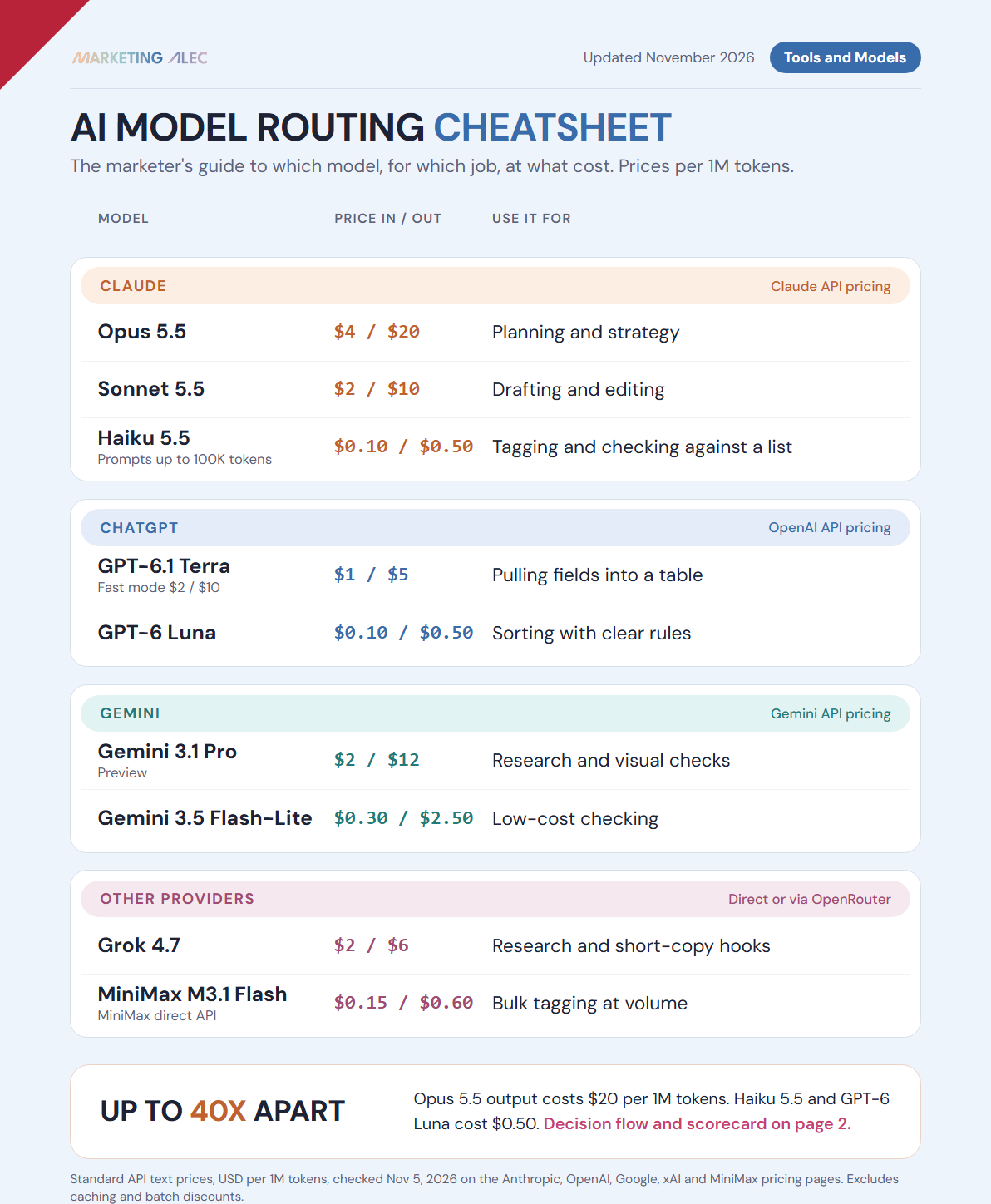
Claude Opus 5.5 costs $20 per million output tokens. Claude Haiku 5.5 and GPT-6 Luna cost $0.50. That's a 40x gap, and while prices keep dropping, the gap between tiers stays.
One default is where the money hides
Whatever model your tool defaults to is usually the expensive one. That one unreviewed setting is the whole leak.
A two-question test replaces the guesswork
I ask what the job needs. "Decide what matters here" goes to Opus. "Say this well" goes to Sonnet. "Check this against that list" goes to Haiku, Luna or cheaper.
It's a habit, not a feature
I treat routing like putting UTMs on every link. You don't skip it just because the workflow already works.
3 jobs to try on a cheaper model
These jobs need care, but they don't need your most expensive model. "Cheaper" here means cheaper than the model you'd default to, which for most of us is Opus. Start with work where you can hand over the source material, explain the rules, and check the result. That's the best place to find out whether a lower-cost model can earn a regular spot in your workflow.
1. Sort customer feedback into useful buckets
Take a small batch of survey answers, product reviews or sales-call comments. Give the model a short list of categories you've already defined, with what belongs in each: price concerns, setup problems, feature requests. It's a sorting job with clear rules, and I like GPT-6 Luna for it.
Include two or three correctly tagged examples, and add a "needs review" option so comments that don't fit have somewhere to go.
Sort each customer comment into one category: price, setup, missing feature, support, praise, or needs review. Return a table with the comment ID, category, and a short exact quote that supports the label. Use needs review when the comment covers several issues or doesn't clearly fit. Don't create new categories. Comments: [paste comments].
2. Pull follow-ups out of meeting notes
A campaign meeting ends with a familiar mess: a transcript, a few decisions, and follow-ups buried between side conversations. A cheaper model can pull out the commitments people actually made, in a fixed table that makes it easy to check who agreed to do what. I use GPT-6.1 Terra on fast mode for this. Fast mode costs the same as Sonnet, and standard mode is half that.
Keep the job narrow. A proposal to change the campaign isn't the same thing as an agreed change.
Extract explicit action items from these meeting notes. Return a table with action, owner, due date, and a short supporting quote. Use "not stated" for missing owners or dates. Keep suggestions and unresolved questions in a separate list. Don't assign work or turn a proposed idea into a commitment. Notes: [paste notes].
3. Turn approved copy into short first drafts
The article, offer and core message are already approved. Now you need a few short posts to support it. Give the model the finished source, your audience, and an example post that sounds like you. Start short: you'll see quickly whether it keeps the meaning or adds claims you never made.
I use Grok for short copy. At $2 / $6 it isn't one of the cheapest models, but it gives me hooks other models don't.
Using only the approved article below, draft three LinkedIn posts of 80–120 words each. Audience: [describe audience]. Match the voice of this example: [paste example]. Give each post a different opening and one clear takeaway. Preserve names and numbers exactly. Don't add statistics, customer stories, promises, or product claims. Approved article: [paste article].
Run a small comparison before you switch
Pick one of the three jobs above and gather ten real examples, including awkward ones where a comment fits two categories, a deadline is missing, or the source copy needs careful wording. Run the same material and instructions through your usual model and the cheaper option.
Write down what a usable result must do before you compare them. For meeting notes, that might mean catching every explicit commitment without inventing an owner or deadline. Then track:
- How many results meet your rules.
- How long each result takes to review and fix.
- How often you need another attempt.
- What the completed job costs under your tool's billing.
I wouldn't use the expensive model's answer as the answer key. Check both against the source material. If both models miss the same instructions, fix the brief before comparing them again, and keep your usual model on jobs where the cheaper one needs more repair.
Ten examples give you a starting signal. Keep reviewing as you expand, especially when the input changes. Google's model-selection guidance follows the same principle: choose an affordable model that meets your quality and speed needs.
Check whether the savings reach your bill
If you pay by usage, compare the total charge for completing the job, including retries. If you're on a fixed monthly subscription, switching models may leave that monthly payment unchanged, so check your plan before counting a saving.
Your time belongs in the calculation too. A cheaper response that takes ten extra minutes to repair may cost you more overall.
Try one job on a cheaper model this week. Keep it there if the results hold up and the total cost falls. The scorecard for this test is in the cheat sheet below.
The cost ladder, top to bottom
These are the prices I'm working from: standard API text prices in US dollars per million tokens, checked November 5, 2026 on each provider's pricing page (Anthropic, OpenAI, Google, xAI, MiniMax). Input is what you send; output is what the model writes. They leave out caching, batch discounts and long-prompt surcharges. Treat this as a starting map, then adjust once you've run your own jobs both ways for a few weeks.
Route by what the task actually needs, not by habit
| Model | Input / output (per 1M tokens) | Route here for |
|---|---|---|
| Claude Opus 5.5 | $4 / $20 | Planning, reviews and strategic synthesis across a pile of context. I don't reach for it on regular work. |
| Gemini 3.1 Pro | $2 / $12 (prompts up to 200K) | Research and visual work: asset audits, brand consistency checks, screenshot review. It's natively multimodal, and its research surfaces signal the others miss. Still a preview model. |
| Claude Sonnet 5.5 | $2 / $10 | My content workhorse. Drafting, editing, anything customer-facing that needs voice and nuance but not deep reasoning. |
| Grok 4.7 | $2 / $6 (prompts under 200K) | SEO and social research: competitor teardowns, thread-mining, SERP analysis. Also short social copy and hooks. |
| GPT-6.1 Terra | $1 / $5 | Extraction: action items, fields and follow-ups pulled into a fixed table. Fast mode doubles the price to $2 / $10, the same as Sonnet. |
| Gemini 3.5 Flash-Lite | $0.30 / $2.50 | Google's low-cost tier. I'd test it against Haiku and Luna on the same mechanical jobs. |
| MiniMax M3.1 Flash | $0.15 / $0.60 | Bulk classification and tagging at volume, the same job run across thousands of records. |
| Claude Haiku 5.5 | $0.10 / $0.50 (prompts up to 100K) | The mechanical parts: tagging, categorizing, scoring against a rubric, formatting. Anywhere you're checking something against a list. |
| GPT-6 Luna | $0.10 / $0.50 | Sorting with clear rules, like feedback into predefined categories. Same price as Haiku, so pick on output quality. |
In my work, roughly 70 to 80% of marketing AI jobs are mechanical: lead scoring, email categorization, draft tagging, quality checks, ad reports, content classification. Another 15 to 25% is writing and applied research, which belongs to Sonnet, Grok and Gemini. The last 5% is real strategic reasoning, and that's the only tier where Opus earns its bill.
The two pitfalls
Which tier is this job?
Six everyday marketing jobs. Make your call on each one, then flip the card.
Spot the pattern? Half of these land in the cheapest tier, and that's where most of the savings hide. The cheat sheet turns this into a two-question decision flow.
Get the full routing cheat sheet
Two pages: input and output prices for the 9 models on this page, the two-question routing test, and a scorecard for your 10-example test.
Why Model Routing Is Now a Marketing Skill
My own six-stage content pipeline, broken down stage by stage, and the pitfalls I hit getting there.
Go deeper
The Marketer's Guide to OpenRouter
Routing across Claude, GPT, Gemini, Grok and open models without juggling five subscriptions: one account, one bill, no lock-in.
10 Money-Saving Marketing Moves with AI
Nine more cost tactics beyond routing, plus how to build the case for your CFO.
AI Terminology Glossary
Quick definitions for every model and term this guide assumes you already know.
Who's behind this? Alec Newcomb, Founder of MarketingAlec and ScaledOn, routes every model on real client work and shares what it costs.
Meet Alec →