
Tools & Models · GPT-6 Astra · Quick Start
GPT-6 Astra Quick-Start Checklist
The moves worth making in your first week with GPT-6 Astra, and the clickable PDF checklist that covers the rest.
.png)
GPT-6 Astra shipped last week. It's a different model, so this isn't a rehash of the release notes, it's what's actually worth changing in your first week, pulled from OpenAI's own docs, what its product lead said on X, and our own testing.
This page covers three of those moves in full. The other two, plus a one-page clickable version of all five, are in the checklist below.
Already sold? Skip to the full checklist →
Week one, at a glance
Reasoning effort goes down, not up
Astra on low outperforms the last model on high. Your old instinct to crank effort up works against you here.
There are two usage clocks now
A five-hour window and a weekly window, and you need room in both to keep working.
OpenAI buried its own anti-slop list
A literal blocklist of the words that make AI writing sound like AI writing, sitting in developer docs nobody in marketing reads.
Astra asks more questions
OpenAI shipped a one-paragraph fix for the permission loop. It's in the full checklist below.
Assignments beat prompts
Goal, Context, Output, Boundaries. OpenAI's own frame for anything that takes more than one step. Also in the checklist.
Turn reasoning effort down, not up
This runs against every instinct the last model trained into you. Tibo Sottiaux, who leads core products at OpenAI, put it plainly on September 6:
Test it on a task you know well before you assume more effort means a better answer. It doesn't, not with this model.
Know your two usage clocks
Astra is metered differently than anything you've used. Limits apply over a five-hour window and a weekly window, and you need allowance left in both to keep working. Settings, then Usage, shows where you stand.
OpenAI's own estimate of local messages per five-hour window (as of September 9)
| Model | Plus | Pro 20x |
|---|---|---|
| GPT-6 Astra | 5 to 45 | 100 to 900 |
| GPT-5.6 Luna | 250 to 2,000 | 5,000 to 40,000 |
Five messages is a real ceiling on Plus. Do your thinking with a cheaper model and bring Astra in for the part that actually needs it.
Paste the anti-slop block into your custom instructions
OpenAI shipped a literal blocklist of the words that make AI writing sound like AI writing. It's buried in developer docs, which is exactly why nobody in marketing has picked it up yet. This is the single best five minutes you'll spend this week, and it works on any model, not just Astra.
Read that twice. Those are the exact tics that make a LinkedIn post smell generated.
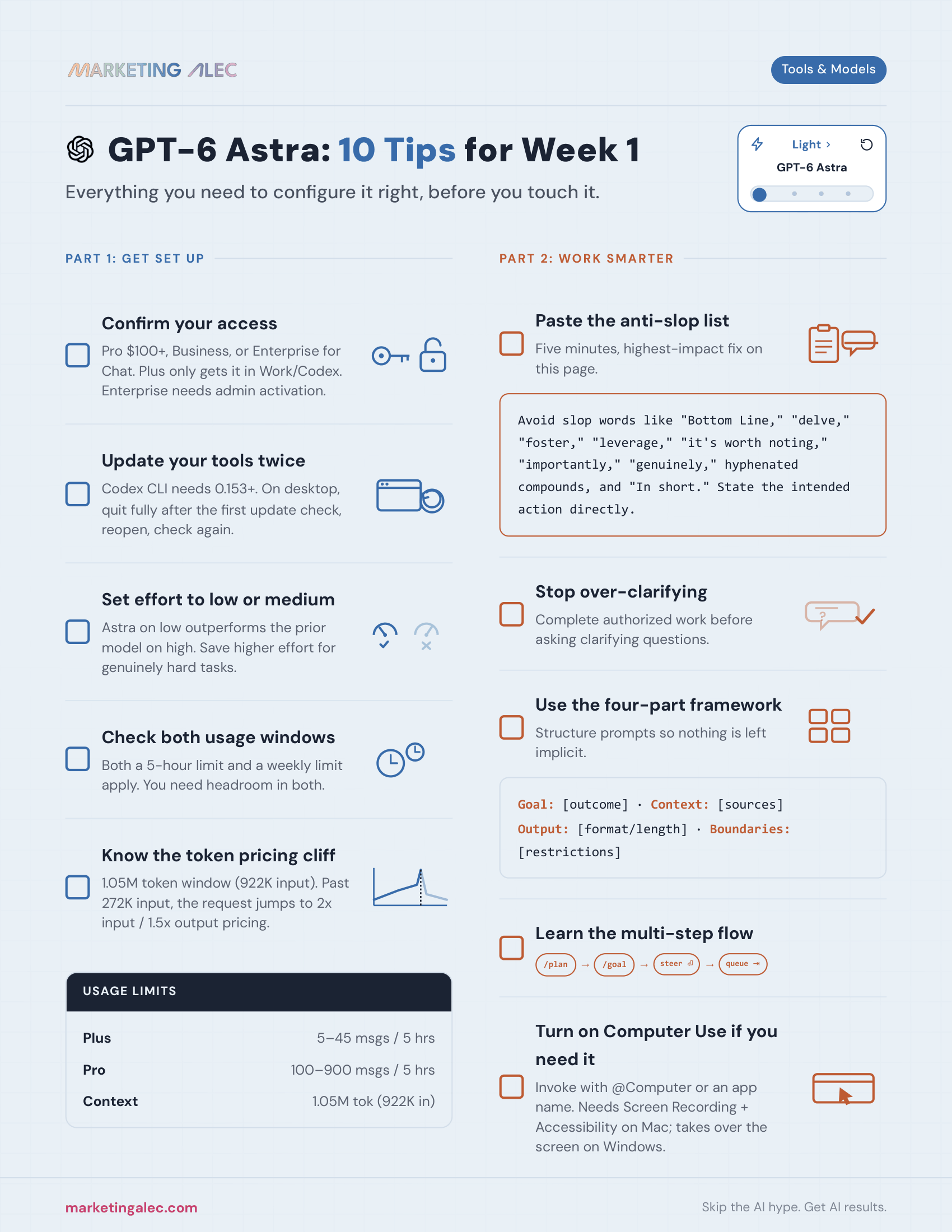
Get the full Week-One Checklist
The three moves above, plus OpenAI's fix for the permission loop and the Goal/Context/Output/Boundaries framework for writing assignments instead of prompts, on one clickable page.
GPT-6 Astra for Marketers: 10 Tips for Week One
This page covers three tips in full. The original post covers all 10, including which Astra your plan actually gives you, turning on computer use, the 272K-token pricing cliff, and the claims worth skipping this week.
Go deeper
The Marketer's Guide to ChatGPT Work
What ChatGPT Work actually is and how to put it to work on real marketing tasks.
Getting Started with Claude
The same kind of no-jargon setup guide, for the other model most marketers keep around.
Top 10 Slash Commands for ChatGPT and Claude
The commands that skip the sentence entirely and go straight to the instruction.
Who's behind this? Alec Newcomb, Founder of MarketingAlec and ScaledOn, tests these tools on real client work every week.
Meet Alec →